Use Cases



 Log in








04.05.2026
news
Auto-Translation in Chats: Break the Language Barrier with SmsGateWay24
The Problem: Your Customer Speaks a Different Language
Running a business that serves international customers means one inevitable challenge — language barriers. A manager who speaks English receives a message in Spanish. A support agent in Germany gets a request in Portuguese. Without a solution, this leads to delays, misunderstandings, and lost customers.
SmsGateWay24 solves this with built-in automatic message translation directly inside the chat interface.
How Auto-Translation Works
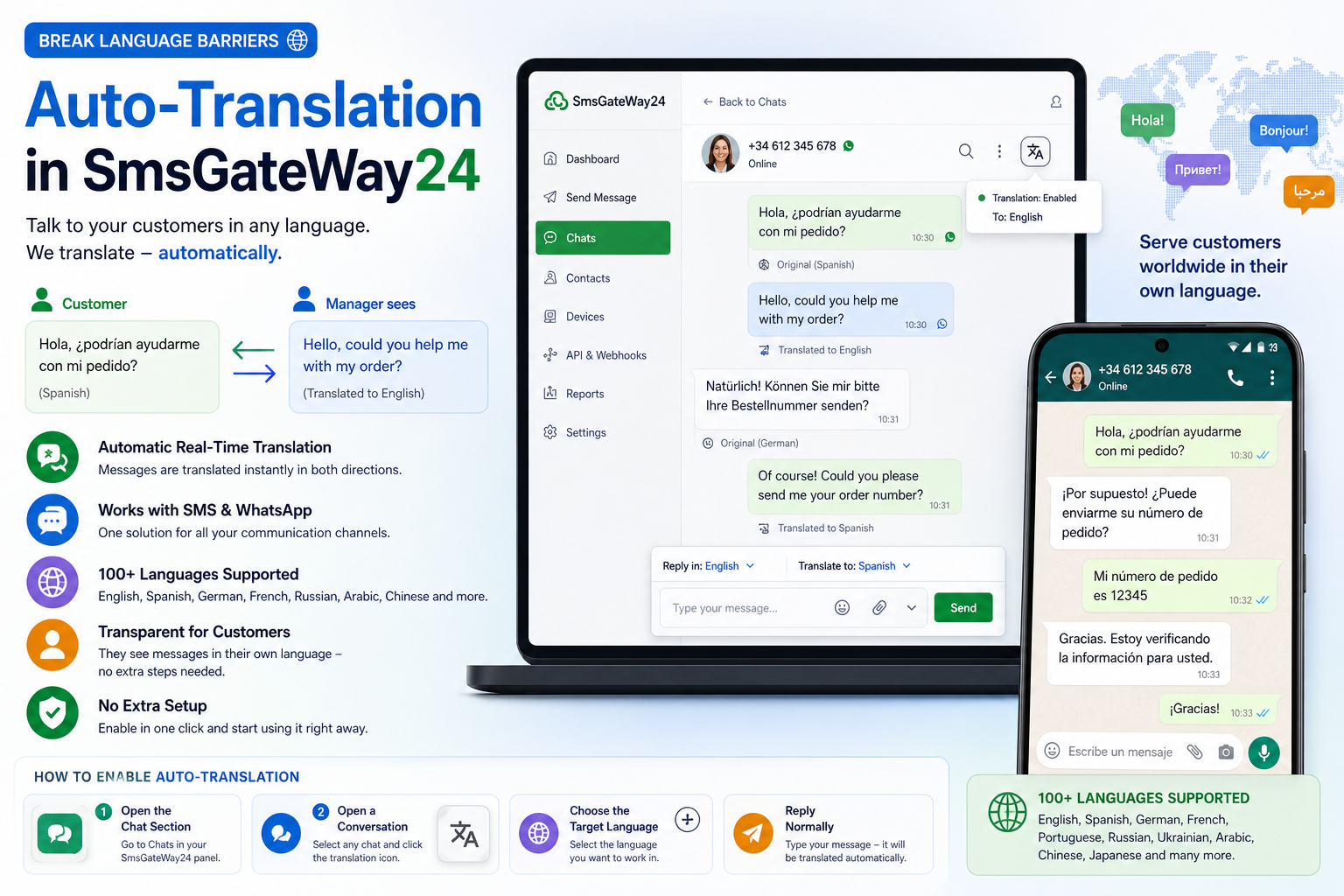
The translation feature works transparently for both sides of the conversation — neither party needs to do anything extra.
For the Customer
The customer writes in their native language — Spanish, Russian, Arabic, or any other. They receive responses already translated into their language. No app to install, no settings to change.
For the Manager
The manager sees all incoming messages automatically translated into their working language. They reply in their own language, and the customer receives it translated. The original text is always available if needed.
Under the Hood
SmsGateWay24 processes translation server-side in real time using translation APIs. There is no noticeable delay for either party, and the conversation flow feels completely natural.
Real Use Cases
International E-Commerce Support
A German online store receives messages from customers across Europe — Spanish, French, Italian, Polish. The support team works in German and serves everyone without hiring multilingual staff.
Service Business with Foreign Clients
A cleaning company or courier service operating in a tourist city receives bookings and questions in dozens of languages. Managers handle everything from one interface in their native language.
Remote Teams with Distributed Managers
A company has managers in Ukraine, Brazil, and the Philippines. They communicate with the same customer base — each manager works in their own language, the system translates automatically between all parties.
How to Enable Auto-Translation
Step 1: Open the Chat Section
Log in to your SmsGateWay24 web panel and navigate to the Chats section.
Step 2: Open a Conversation
Select any contact or incoming chat thread. Find the translation icon in the top toolbar of the conversation.
Step 3: Choose the Target Language
Select the language your manager works in. All incoming messages will now appear translated into that language.
Step 4: Reply Normally
Type your response in your language. It will be delivered to the customer translated into their language automatically.
Key Benefits
- No language barrier — serve customers globally without multilingual hiring
- Real-time translation — no manual copy-paste to external tools
- Works with SMS and WhatsApp — covers all major messaging channels
- Transparent to the customer — seamless experience in their language
- 100+ languages supported — English, Spanish, German, French, Portuguese, Russian, Ukrainian, Arabic, Chinese, and more
Why This Matters for Your Business
Customer satisfaction drops sharply when people cannot communicate in their language. Studies show that 72% of customers prefer to buy from websites in their native language, and 56% say getting information in their own language matters more than price.
Auto-translation removes this friction at the communication layer — directly in the SMS and WhatsApp chats your customers already use every day.
Get Started Today
Auto-translation is available in SmsGateWay24 in the current version. Log in to your account, open the chat section, and enable translation for any conversation. No additional setup required — just open a chat and start talking to customers in any language.
Video Tutorials
View all SMS gateway tutorials
How to Send SMS from Excel Using SIM Card and Sender ID: Step-by-Step Guide
Learn how to easily send SMS f...
How to use Webhooks
1. When an SMS receives any de...
How to Send SMS Messages to Your Clients Using a Regular Phone
In this article, you will lear...
Send and Receive WhatsApp Messages via SmsGateWay24 — Now Available in App Version 13
SmsGateWay24 app version 13 br...
Auto-Translation in Chats: Break the Language Barrier with SmsGateWay24
Your customer writes in Spanis...
SMSGateway24 — new version 13.0.2 is available
SMSGateway24 — new version 13....
New app version is released (12.1.22)
We are pleased to announce the...